Introduction
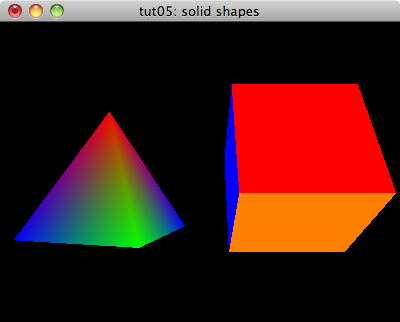
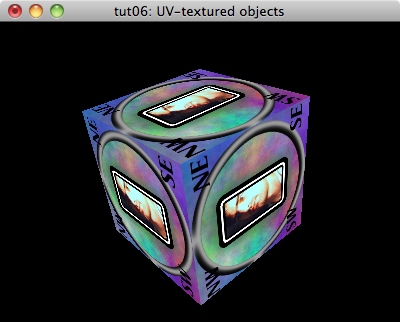
In the previous tutorial, we drew a rotating pyramid and a rotating cube. The next NeHe tutorial renders a textured cube rotating at different speeds around each axis.
Again, we’re going to start with our simple-tutorial base.
#<:use "simple-tutorial.lisp">
Here is the resulting tut06.lisp.
"tut06: UV-textured objects"
The texture
We’re going to use a slot in our window class to store the texture. Note: it might be nice some day to break the cube out into its own class which could store its own position, rotation, and texture. For now though, we’re just going to keep piling stuff into our window class.
(texture-id :initform nil :accessor texture-id)
Loading the texture
To load the texture, I’m going to use the CL-PNG wrapper around the PNG library. So, let’s get it loaded.
(asdf:load-system :png)
Then, I’m going to need some function that reads in a PNG and creates an OpenGL texture from it. I’m going to make my function take a filename for the PNG image and an optional texture id to use for the texture. (If you don’t pass in a texture id, one is created using gl:gen-textures. The argument to gl:gen-textures tells OpenGL how many textures you want to reserve. You can call gl:gen-textures multiple times. I’m not sure what benefit, if any, you get from allocating several of them simultaneously.)
So, we’re going to open the file and decode the PNG. Then, we’re going to try to turn it into a texture. If we succeed, then we’re going to
(defun load-png ( filename &optional (texture-id (car (gl:gen-textures 1))
texture-id-p) )
(flet (#<:use "load-png: load-and-decode image">)
(handler-case
(let ((png (load-and-decode filename)))
(assert png) ; make sure we got the png
#<:use "load-png: turn png into a texture">
texture-id) ; return the texture-id on success
#<:use "load-png: handle errors">
)))
To load the image, we’re going to open the file and decode it. We have to make sure to open the file for binary input.
(load-and-decode (filename)
(with-open-file (in filename
:element-type '(unsigned-byte 8))
(png:decode in)))
To turn the PNG into a texture, we first have to make sure that OpenGL knows that we’re going to start tweaking this particular texture. To do that, we use bind-texture and tell it we’re working with a two-dimensional texture here. (OpenGL supports 1-, 2-, and 3-dimensional textures.)
(gl:bind-texture :texture-2d texture-id)
Now, we’re going to need to hand OpenGL our texture data. The CL-PNG library keeps our data in a three-dimensional array (width, height, channels). We need to get this down to a one-dimensional array for OpenGL. Fortunately, we can take advantage of the fact that Common Lisp arrays are stored contiguously. We’ll create an array called data that is a one-dimensional view into our three-dimensional array and let OpenGL copy from it.
(let ((ww (png:image-width png))
(hh (png:image-height png))
(cc (png:image-channels png)))
(let ((data (make-array (list (* ww hh cc))
:element-type (array-element-type png)
:displaced-to png)))
#<:use "load-png: copy data to texture">
#<:use "load-png: set up texture filters">))
To copy the data into the texture, we need to tell OpenGL how the data is laid out.
(let ((level-of-detail 0)
(internal-format #<:use "load-png: determine internal-format">)
(border 0)
(format #<:use "load-png: determine format">)
(data-type #<:use "load-png: determine data-type">))
(gl:tex-image-2d :texture-2d
level-of-detail
internal-format
ww
hh
border
format
data-type
data))
The level-of-detail is used if we’re going to manually specify what this image looks like at different resolutions. For our purposes in this tutorial, we’re just going to let OpenGL handle all of the scaling for our texture so we’ll stick with the default level of detail.
The internal-format tells OpenGL what type of texture this is going to be. We’re going to use the number of bits per sample and the number image channels to figure out what format this texture should be inside OpenGL.
(ecase (png:image-bit-depth png)
(8 (ecase cc
(1 :luminance8)
(2 :luminance8-alpha8)
(3 :rgb8)
(4 :rgba8)))
(16 (ecase cc
(1 :luminance16)
(2 :luminance16-alpha16)
(3 :rgb16)
(4 :rgba16))))
The border parameter can be either zero or one. If it is zero, then the image width and height must be a power of two. If it is one, then the image width and height must be two plus a power of two. For our purposes, we’re just going to assume that the image is a power of two in width and height.
The format parameter declares what kind of data we have in our array. We’re going to use the number of image channels to come up with the right value here. With the internal format, we were able to blend both the size of the samples and the meaning of the samples into one parameter. For our input data, we give both format and data-type.
(ecase cc
(1 :luminance)
(2 :luminance-alpha)
(3 :rgb)
(4 :rgba))
For the data type, we work from the number of bits per sample.
(ecase (png:image-bit-depth png)
(8 :unsigned-byte)
(16 :unsigned-short))
After we have the texture data loaded, we tell OpenGL how to scale our texture when it needs it in a smaller or larger size. We are going to tell it to use linear filtering whether it needs to minimize or magnify our texture.
(gl:tex-parameter :texture-2d :texture-min-filter :linear)
(gl:tex-parameter :texture-2d :texture-mag-filter :linear)
That wraps up making the texture. If we ran into an error somewhere along the line of turning the png into a texture, we’re going to delete the texture if we allocated it and return nil.
(error ()
(unless texture-id-p
(gl:delete-textures (list texture-id)))
nil)
Initializing our texture
To initialize our texture, we’re going to load it with the function above. Assuming that it loaded okay, we’re going to go ahead and enable texturing.
#<:use "display-window: make sure texture is loaded">
#<:use "display-window: enable texturing">
(unless (texture-id win) ; load texture if needed
(setf (texture-id win)
(load-png #P"./images/cube-texture.png")))
(when (texture-id win) ; enable texturing if we have one
(gl:enable :texture-2d))
Rotation state
For this tutorial, our rotation state is going to consist of three angles, one for the rotation around the x-axis, one for the rotation around the y-axis, and one for the rotation around the z-axis. Each of these will initially be zero.
(defclass rotation-state ()
((x-angle :initarg :x-angle :reader x-angle)
(y-angle :initarg :y-angle :reader y-angle)
(z-angle :initarg :z-angle :reader z-angle))
(:default-initargs :x-angle 0.0
:y-angle 0.0
:z-angle 0.0))
We’re also going to add the rotation state into our window class.
(rotation-state :initarg :rotation-state :accessor rotation-state)
And, make sure we initialize our rotation state.
:rotation-state (make-instance 'rotation-state)
Preparing the tick function
Again, we’re going to try to stay near 60 frames per second. Recall that the tick interval is specified in milliseconds per tick.
:tick-interval (round 1000 60) ; milliseconds per tick
We’re going to use a different rotation speed for each axis. We’ll update all three at once in the tick method.
(defmethod glut:tick ((win my-window))
; retrieve the current rotation
(let* ((cur (rotation-state win))
; retrieve the current angles
(x-angle (x-angle cur))
(y-angle (y-angle cur))
(z-angle (z-angle cur)))
(setf (rotation-state win) ; replace the rotation state
(make-instance 'rotation-state
:x-angle (+ x-angle 0.3)
:y-angle (+ y-angle 0.2)
:z-angle (+ z-angle 0.4))))
(glut:post-redisplay)) ; tell GLUT to redraw
Drawing textured cubes
In the base code, we already cleared the color buffer and the depth buffer and reset the modelview matrix. Now, retrieve our rotation angles, move back into the screen, rotate through each of our angles, and draw the cube with textures.
(let* ((cur (rotation-state win))
(x-angle (x-angle cur))
(y-angle (y-angle cur))
(z-angle (z-angle cur)))
(gl:translate 0.0 0.0 -5.0) ; move and rotate
(gl:rotate x-angle 1.0 0.0 0.0)
(gl:rotate y-angle 0.0 1.0 0.0)
(gl:rotate z-angle 0.0 0.0 1.0)
#<:use "draw textured-cube">) ; draw the cube
Drawing the cube
To draw the cube, we first want to make sure that we have the right texture selected. Then we are going to draw each face of the cube as a textured quad.
(when (texture-id win) ; bind the texture if we have it
(gl:bind-texture :texture-2d (texture-id win)))
(gl:with-primitives :quads
#<:use "draw textured cube faces">)
The texured cube faces are going to be like our colored faces. Before each vertex though, instead of specifying a color, we’re going to specify the texture coordinates for that vertex. The coordinates in the texture range from 0.0 to 1.0. The point (0,0) is at the top left of the texture and the point (1,1) is at the bottom right of the texure.
This isn’t the same coordinate system mentioned in the original NeHe document. The reason for that is that he is loading a Windows Bitmap. Windows Bitmaps are stored with the image from bottom to top as you proceed through the file.
Here is the front face. Note how we are going counterclockwise in both the texture coordinates and the spatial coordinates. (Note: It is traditional to show the texture coordinates and vertex coordinates as sort of two columns of source code.)
;; front face
(gl:tex-coord 0.0 1.0) (gl:vertex -1.0 -1.0 1.0)
(gl:tex-coord 1.0 1.0) (gl:vertex 1.0 -1.0 1.0)
(gl:tex-coord 1.0 0.0) (gl:vertex 1.0 1.0 1.0)
(gl:tex-coord 0.0 0.0) (gl:vertex -1.0 1.0 1.0)
The same sort of logic continues around to the remaining five faces. I’m going to write a little function though to hopefully speed this along. Hopefully, if I use constants and an inline function, most of the calculation herein will get optimized into constants, too.
(declaim (inline cube-face))
(defun cube-face (left up forw)
(gl:tex-coord 0.0 1.0) ; bottom-left
(gl:vertex (+ (- (elt left 0)) (- (elt up 0)) (elt forw 0))
(+ (- (elt left 1)) (- (elt up 1)) (elt forw 1))
(+ (- (elt left 2)) (- (elt up 2)) (elt forw 2)))
(gl:tex-coord 1.0 1.0) ; bottom-right
(gl:vertex (+ (+ (elt left 0)) (- (elt up 0)) (elt forw 0))
(+ (+ (elt left 1)) (- (elt up 1)) (elt forw 1))
(+ (+ (elt left 2)) (- (elt up 2)) (elt forw 2)))
(gl:tex-coord 1.0 0.0) ; top-right
(gl:vertex (+ (+ (elt left 0)) (+ (elt up 0)) (elt forw 0))
(+ (+ (elt left 1)) (+ (elt up 1)) (elt forw 1))
(+ (+ (elt left 2)) (+ (elt up 2)) (elt forw 2)))
(gl:tex-coord 0.0 0.0) ; top-left
(gl:vertex (+ (- (elt left 0)) (+ (elt up 0)) (elt forw 0))
(+ (- (elt left 1)) (+ (elt up 1)) (elt forw 1))
(+ (- (elt left 2)) (+ (elt up 2)) (elt forw 2))))
Now, I can whip through the faces just saying which way is left, which way is up, and which way is forward for that face.
;; back face
(cube-face #(1.0 0.0 0.0) #(0.0 -1.0 0.0) #(0.0 0.0 -1.0))
;; top face
(cube-face #(1.0 0.0 0.0) #(0.0 0.0 -1.0) #(0.0 1.0 0.0))
;; bottom face
(cube-face #(1.0 0.0 0.0) #(0.0 0.0 1.0) #(0.0 -1.0 0.0))
;; right face
(cube-face #(0.0 0.0 -1.0) #(0.0 1.0 0.0) #(1.0 0.0 0.0))
;; left face
(cube-face #(0.0 0.0 1.0) #(0.0 1.0 0.0) #(-1.0 0.0 0.0))
And, now we have a textured cube.